Free Image to Prompt Generator: The Ultimate Guide
imagepixa Team
Image Processing Specialists
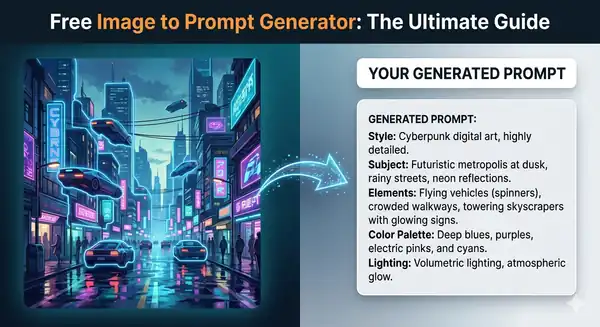
Ever found a stunning image online and wondered exactly what words were used to create it? Or maybe you want to generate variations of your own photos using AI? Our new Free Image to Prompt Generator is here to help you reverse-engineer the perfect AI prompt in seconds.
What is an Image to Prompt Generator?
An image to prompt generator is a powerful AI tool that works in reverse: instead of typing text to generate an image, you upload an image, and the AI analyzes it to create a highly detailed text description. This description—or prompt—captures the visual elements, style, composition, colors, lighting, and mood of your original image.
You can then seamlessly copy this generated prompt and paste it into AI image generation platforms like Midjourney, DALL-E, Stable Diffusion, or Leonardo AI to create fresh images in a similar style.
Why Use Reverse Image Prompting?
- Recreate Artwork Styles: Discover the specific artistic keywords, mediums, and styles needed to replicate a specific look (e.g., "cyberpunk illustration", "watercolor painting", "cinematic lighting").
- Save Time Experimenting: Instead of guessing the right words and running dozens of failed generations, use a reference image to give the AI exactly what it needs from the start.
- E-commerce Variations: Upload a product photo to grab a base prompt, then modify it to place your product in new environments or lighting setups.
- Multilingual Support: Our tool supports prompt generation in 9+ languages, allowing you to bypass language barriers in AI creation.
How to Use the Image to Prompt Tool
Using our free tool takes less than a minute and requires absolutely no sign-up.
1. Upload Your Reference Image
Navigate to the Image to Prompt Dashboard. You can drag and drop a file (JPG, PNG, WebP) directly from your computer or paste an image URL.
2. Select Your Output Language
By default, prompts are generated in English (which most AI models understand best), but you can select from multiple languages if your preferred AI platform supports them.
3. Generate & Copy
Click "Generate Prompt." Our AI will scan your image and output a comprehensive text block. Using our one-click copy button, grab your prompt and head over to your favorite AI generator!
Best Practices for AI Prompts
While our tool gives you an incredibly accurate starting point, the true magic happens when you customize it. Once you have your imported prompt, try adjusting the subject, swapping the color palette, or adding specific camera lenses and lighting styles to create something wholly unique.
Ready to explore the possibilities of reverse-engineering AI art? Try our Image to Prompt Generator today!
Ready to optimize your images?
Resize your photos to the perfect dimensions instantly.